UnfyOpenSCADLib
LibFile: unfy_fasteners.scad
UnfyOpenSCADLib Copyright Leif Burrow 2026 kc8rwr@unfy.us unforgettability.net
This file is part of UnfyOpenSCADLib.
Unfy_fasteners.scad contains modules for creating bolts, screws, nuts, washers, heatsink inserts and more. These models at the time do not include threads. Their purpose is for subtracting from a model to create holes and countersinks. Realistic models with threads could be added later if there is a use for them.
Fasteners may be generated to size by passing the size as a string. Metric sizes may be passed as “M<number>” such as “M4” or “M3”. It is case insensitie so “m4” or “m3” will work as well. Numbered SAE sizes are represented as “#<number>”, such as “#6” or “#8”. Inch sizes are represented as a decimal number or as a fraction. “1/4” or “0.25” would both represent 1/4”.
Tables are included for looking up dimensions based on these sizes. Shaft diameter of course is the size itself in it’s respective units. Tables also include things like typical diameters and thicknesses of heads for various bolt types, nut, washer and heatset insert dimensions, etc… Most sizes commonly used in 3d-printed projects as well as larger fasteners commonly available in hardware stores are included. If sizes that are outside of the built in tables are requested then the code will attempt to interpolate the missing value.
Functions are included to look up the various dimensions of fasteners by size and type. This way one using this library may allow the end user to choose fastener sizes from the customizer menu. Then the script may adapt, re-sizing or re-positioning things based on the outer dimensions of the requested fastener sizes. Sizes may be looked up as scalars describing just one dimension. Or they may be looked up as a vector which may then be passed to the functions that look up the individual dimensions or the module which renders the part. This way the lookup and/or interpolation need only happen once.
The goal here is to allow the user to create customizable designs where the end user may choose parts that they already have on hand or parts that are easily available. Designers are encouraged to give the end-user plenty of choices. Perfectly valid arguments regarding the merits of measurement systems aside, the best fastener size is the one you already have on hand. The next best is the one your local hardware store sells in bulk rather than the specialty isle.
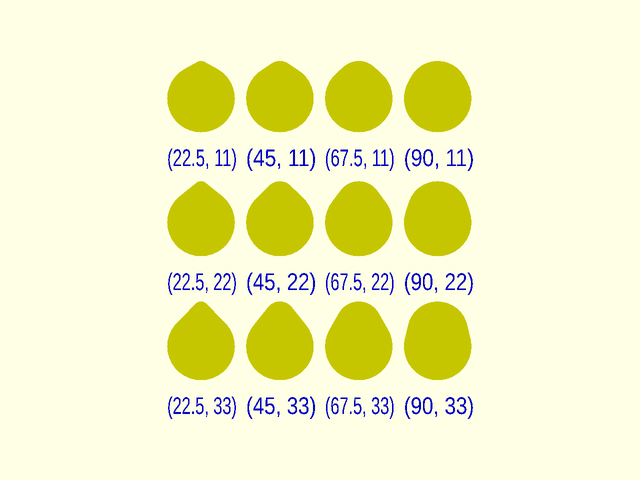
Provisions are included for distorting horizontal bolt holes, to remove some extra material from the top side. This way when printing via fused filament fabrication plastic which sags down will just cancel this distortion out rather than requiring drilling so the bolt can fit cleanly. The distortion is defined by two special variables, $unf-hdist_y and $unf_hdist_x. These define the extra removed material by height and width respectively, both as a percentage of the shaft diameter.
So far this feature has been developed only for bolt holes and not the other parts. The original intention was to distort every part depending on the angle at which it is rendered. Unfortunately there is no good way to know what angle a part is being rendered in OpenSCAD so it relies on the user telling it. Thus this feature has not been furtner developed.
File Contents
unf_fnr_type– Fastener Typeunf_fnr_size– Fastener Sizeunf_fnr_diameter– Fastener Clearance Diameterunf_fnr_shaft_diameter– Fastener Shaft Diameter
- Section: Distorted Shafts
unf_shaft– Fastener Shaftdistortion_test_block– Shaft Distortion Test Block
- Section: Cap Bolts - unf_cap_*
unf_cap_v– Cap Head Bolt Vectorunf_cap_head_diameter– Cap Head Bolt Clearance Diameterunf_cap_head_height– Cap Head Bolt Head Heightunf_cap_default_length– Cap Head Bolt Default Lengthunf_cap– Cap Head Bolt
- Section: Countersunk Bolts - unf_csk_*
unf_csk_v– Counter Sunk Bolt Vectorunf_csk_head_diameter– Countersunk Head Clearance Diameterunf_csk_head_height– Countersunk Head Heightunf_csk_default_length– Countersunk Bolt Default Lengthunf_csk– Countersunk Bolt
- Section: Hex Head Bolts - unf_hex_*
unf_hex_v– Hex Head Bolt Vectorunf_hex_head_diameter– Hex Head Bolt Clearance Diameterunf_hex_head_height– Hex Head Heightunf_hex_default_length– Hex Head Bolt Default Lengthunf_hex– Hex Head Bolt
- Section: Heatset Inserts - unf_hst_*
unf_hst_v– Heatset Insert Vectorunf_hst_diameter– Heatset Insert Diameterunf_hst_height– Heatset Insert Heightunf_hst– Heatset Insert
- Section: Hex Nut - unf_nut_*
unf_nut_v– hex-nut vectorunf_nut_diameter– Hex Nut Clearance Diameterunf_nut_height– Hex Nut Heightunf_nut– Hex Nut
- Section: Square Nut - unf_sqr_*
unf_sqr_v– Square Nut Vectorunf_sqr_length– Square Nut Side Lengthunf_sqr_height– Square Nut Height / Thicknessunf_sqr– Square Nut
- Section: Washer unf_wsh_*
unf_wsh_v– Washer Vectorunf_wsh_head_diameter– Washer Clearance Diameterunf_wsh_head_height– Washer Thickness (height lying flat)unf_wsh– Washer
- Section: Pillar
unf_pillar_pos– Render the positive part of a fastener pillarunf_pillar_neg– Render the negative part of a fastener pillarunf_pillar– Render a fastener pillar
- Section: Licensing
Function: unf_fnr_type
Synopsis: Fastener Type
Usage:
- unf_fnr_type(fastener_vector)
Description:
Takes a vector describing a fastener and returns a string representing the fastener type.
Arguments:
| By Position | What it does |
|---|---|
in |
vector describing an unfy_fastener |
Function: unf_fnr_size
Synopsis: Fastener Size
Usage:
- unf_fnr_size(fastener_size_or_vector)
Description:
Takes a vector describing a fastener or a string representing the fastener size and returns a string representing the fastener size.
Of course this isnt’t doing much when it is passed the string. This is done so that a variable may hold the size string which the user requested before it is expanded into the vector and still work in the same code.
Arguments:
| By Position | What it does |
|---|---|
in |
vector describing an unfy_fastener or a string representing the size of one. |
Function: unf_fnr_diameter
Synopsis: Fastener Clearance Diameter
Usage:
- unf_fnr_diameter(fastener_size_or_vector)
Description:
Takes a vector describing a fastener or a string representing the fastener size and returns the diameter of the widest part in millimeters. Useful for calculating positioning or sizes of parts that will contain the fastener when the end-user is allowed to pick from a variety of sizes of fasteners.
Arguments:
| By Position | What it does |
|---|---|
in |
vector describing an unfy_fastener or a string representing the size of one. |
Function: unf_fnr_shaft_diameter
Synopsis: Fastener Shaft Diameter
Usage:
- unf_fnr_shaft_diameter(fastener_size_or_vector)
Description:
Takes a vector describing a fastener or a string representing the fastener size and returns the shaft diameter in millimeters.
Arguments:
| By Position | What it does |
|---|---|
in |
vector describing an unfy_fastener or a string representing the size of one. |
Section: Distorted Shafts
Module: unf_shaft
Synopsis: Fastener Shaft
Usage:
- unf_shaft(diameter, length, distorted, $unf_hdist_x, $unf_hdist_y, body_color)
Description:
Render a fastener shaft hole, optionally with distortions to account for overhang sagging when 3d-printing.
Figure 2.1.1: various values of unf_hdist_x and unf_hdist_y. (0, 0) or distorted=false would be a perfect circle.
Arguments:
| By Position | What it does |
|---|---|
diameter |
shaft diameter in mm |
length |
length in mm |
distorted |
true/false should this be distorted |
body_color |
color in which to render the shaft if rendered as a positive, color of the cut surfaces if rendering as a negative. |
| By Name | What it does |
|---|---|
$unf_hdist_x |
width of distortion as a percentage of the diameter (0-100) |
$unf_hdist_y |
height of distortion as a percentage of the diameter (0-100) |
Module: distortion_test_block
Synopsis: Shaft Distortion Test Block
Usage:
- distortion_test_block(diameter, depth, steps, min_spacing, min_dist_x, max_dist_x, min_dist_y, max_dist_y, include_control, body_color, subtraction_color)
Description:
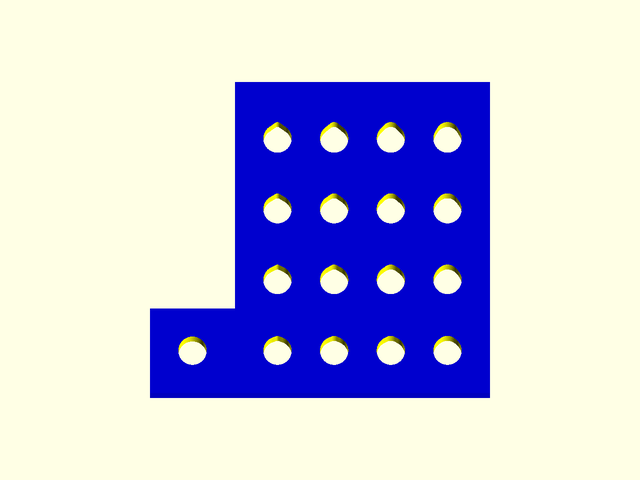
Render a block with a series of distorted bolt shafts with varying values of unf_hdist_x and unf_hdist_y for choosing the best values to use with a particular setup.
Figure 2.2.1:
Arguments:
| By Position | What it does |
|---|---|
diameter |
shaft diameter |
depth |
thickness of the block |
steps |
number of rows, columns |
min_spacing |
minimum spacing between holes |
min_dist_x |
minimum unf_hdist_x to try |
max_dist_x |
maximum unf_hdist_x to try |
min_dist_y |
minimum unf_hdist_y to try |
max_dist_y |
maximum unf_hdist_y to try |
body_color |
color of the block |
subtraction_color |
color of the surfaces cut into the block by the test holes |
Section: Cap Bolts - unf_cap_*
The vector representing a cap bolt will consist of, in order:
- name
- bolt_diameter
- head_diameter
- head_height
- default_length
Function: unf_cap_v
Synopsis: Cap Head Bolt Vector
Usage:
- unf_cap_v(size_or_vector)
Description:
Retrieve a vector representing the dimensions of a cap-head bolt given the size. Will return the passed parameter if passed a vector. Thus sizes and dimension vectors may be treated interchangably.
Arguments:
| By Position | What it does |
|---|---|
size |
size as a string or the vector itself |
Function: unf_cap_head_diameter
Synopsis: Cap Head Bolt Clearance Diameter
Usage:
- unf_cap_head_diameter(size_or_vector)
Description:
Retrieve the diameter in mm of the head of a cap-head bolt given the size.
Arguments:
| By Position | What it does |
|---|---|
size |
size as a string or the unf_cap_v() vector itself |
Function: unf_cap_head_height
Synopsis: Cap Head Bolt Head Height
Usage:
- unf_cap_head_height(size_or_vector)
Description:
Retrieve the height or thickness in mm of the head of a cap-head bolt given the size.
Arguments:
| By Position | What it does |
|---|---|
size |
size as a string or the unf_cap_v() vector itself |
Function: unf_cap_default_length
Synopsis: Cap Head Bolt Default Length
Usage:
- unf_cap_default_length(size_or_vector)
Description:
Retrieve a default length for a cap head bolt given it’s size. Probably not very useful in a real design, good for picking a length to demonstrate an example of a unf_cap bolt.
Arguments:
| By Position | What it does |
|---|---|
size |
size as a string or the unf_cap_v() vector itself |
Module: unf_cap
Synopsis: Cap Head Bolt
Usage:
- unf_cap(size, length, head_ext, distorted, $unf_hdist_x, $unf_hdist_y, body_color)
Description:

Render a negative for a shaft and/or head-recess for a cap-head bolt. Note, the cap head is rendered as a simple cylinder with the diameter of the widest part of the actual head. This is because it is meant for being a negative, to recess a bolt and not for printing an actual bolt.
Figure 3.5.1: note - the head_ext area is semi-transparent.
Arguments:
| By Position | What it does |
|---|---|
size |
string representing the size or the unf_cap_v() vector. |
length |
length in mm |
head_ext |
length in mm to recess the head beyond just it’s thickness |
distorted |
true/false, should the bolt hole be distorted |
body_color |
color in which to render the bolt if rendered as a positive, color of the cut surfaces if rendering as a negative. |
| By Name | What it does |
|---|---|
$unf_hdist_x |
width of distortion as a percentage of the diameter (0-100) |
$unf_hdist_y |
height of distortion as a percentage of the diameter (0-100) |
Section: Countersunk Bolts - unf_csk_*
The vector representing a countersunk bolt will consist of, in order:
- name
- bolt_diameter
- head_diameter
- head_height
- default_length
Function: unf_csk_v
Synopsis: Counter Sunk Bolt Vector
Usage:
- unf_csk_v(size_or_vector)
Description:
Retrieve a vector representing the dimensions of a countersunk bolt given the size. Will return the passed parameter if passed a vector. Thus sizes and dimension vectors may be treated interchangably.
Arguments:
| By Position | What it does |
|---|---|
size |
size as a string or the vector itself |
Function: unf_csk_head_diameter
Synopsis: Countersunk Head Clearance Diameter
Usage:
- unf_csk_head_diameter(size_or_vector)
Description:
Retrieve the diameter in mm of the head of a countersunk bolt given the size.
Arguments:
| By Position | What it does |
|---|---|
size |
size as a string or the unf_csk_v() vector itself |
Function: unf_csk_head_height
Synopsis: Countersunk Head Height
Usage:
- unf_csk_head_height(size_or_vector)
Description:
Retrieve the height or thickness in mm of the head of a countersunk bolt given the size.
Arguments:
| By Position | What it does |
|---|---|
size |
size as a string or the unf_cap_v() vector itself |
Function: unf_csk_default_length
Synopsis: Countersunk Bolt Default Length
Usage:
- unf_csk_default_length(size_or_vector)
Description:
Retrieve a default length for a countersunk bolt given it’s size. Probably not very useful in a real design, good for picking a length to demonstrate an example of a unf_csk bolt.
Arguments:
| By Position | What it does |
|---|---|
size |
size as a string or the unf_cap_v() vector itself |
Module: unf_csk
Synopsis: Countersunk Bolt
Usage:
- unf_csk(size, length, head_ext, distorted, body_color)
Description:

Render a negative for a shaft and/or head-recess for a cap-head bolt. Note, the cap head is rendered as a simple cylinder with the diameter of the widest part of the actual head. This is because it is meant for being a negative, to recess a bolt and not for printing an actual bolt.
Figure 4.5.1: note - the head_ext area is semi-transparent.
Arguments:
| By Position | What it does |
|---|---|
size |
string representing the size or the unf_cap_v() vector. |
length |
length in mm |
head_ext |
length in mm to recess the head beyond just it’s thickness |
distorted |
true/false, should the bolt hole be distorted |
body_color |
color in which to render the bolt if rendered as a positive, color of the cut surfaces if rendering as a negative. |
| By Name | What it does |
|---|---|
$unf_hdist_x |
width of distortion as a percentage of the diameter (0-100) |
$unf_hdist_y |
height of distortion as a percentage of the diameter (0-100) |
Section: Hex Head Bolts - unf_hex_*
The vector representing a hex head bolt will consist of, in order:
- name
- bolt_diameter
- head_diameter
- head_height
- default_length
Function: unf_hex_v
Synopsis: Hex Head Bolt Vector
Usage:
- unf_hex_v(size_or_vector)
Description:
Retrieve a vector representing the dimensions of a hex-head bolt given the size. Will return the passed parameter if passed a vector. Thus sizes and dimension vectors may be treated interchangably.
Arguments:
| By Position | What it does |
|---|---|
size |
size as a string or the vector itself |
Function: unf_hex_head_diameter
Synopsis: Hex Head Bolt Clearance Diameter
Usage:
- unf_hex_head_diameter(size_or_vector)
Description:
Retrieve the diameter in mm of the head of a hex-head bolt given the size.
Arguments:
| By Position | What it does |
|---|---|
size |
size as a string or the unf_hex_v() vector itself |
Function: unf_hex_head_height
Synopsis: Hex Head Height
Usage:
- unf_hex_head_height(size_or_vector)
Description:
Retrieve the height or thickness in mm of the head of a hex-head bolt given the size.
Arguments:
| By Position | What it does |
|---|---|
size |
size as a string or the unf_hex_v() vector itself |
Function: unf_hex_default_length
Synopsis: Hex Head Bolt Default Length
Usage:
- unf_hex_default_length(size_or_vector)
Description:
Retrieve a default length for a hex head bolt given it’s size. Probably not very useful in a real design, good for picking a length to demonstrate an example of a unf_hrx bolt.
Arguments:
| By Position | What it does |
|---|---|
size |
size as a string or the unf_hex_v() vector itself |
Module: unf_hex
Synopsis: Hex Head Bolt
Usage:
- unf_hex(size, length, head_ext, distorted, body_color)
Description:

Render a negative for a shaft and/or head-recess for a hex-head bolt.
Figure 5.5.1: note - the head_ext area is semi-transparent.
Arguments:
| By Position | What it does |
|---|---|
size |
string representing the size or the unf_hex_v() vector. |
length |
length in mm |
head_ext |
length in mm to recess the head beyond just it’s thickness |
distorted |
true/false, should the bolt hole be distorted |
body_color |
color in which to render the bolt if rendered as a positive, color of the cut surfaces if rendering as a negative. |
| By Name | What it does |
|---|---|
$unf_hdist_x |
width of distortion as a percentage of the diameter (0-100) |
$unf_hdist_y |
height of distortion as a percentage of the diameter (0-100) |
Section: Heatset Inserts - unf_hst_*
The vector representing a heatset insert will contain, in order:
- name
- shaft_diameter
- insert_diameter
- length
note - these are pilot hole dimensions, not dimensions of the actual insert
Function: unf_hst_v
Synopsis: Heatset Insert Vector
Usage:
- unf_hst_v(size_or_vector)
Description:
Retrieve a vector representing the dimensions of a heatset insert given the size. Will return the passed parameter if passed a vector. Thus sizes and dimension vectors may be treated interchangably.
Arguments:
| By Position | What it does |
|---|---|
size |
size as a string or the vector itself |
Function: unf_hst_diameter
Synopsis: Heatset Insert Diameter
Usage:
- unf_hst_diameter(size_or_vector)
Description:
Retrieve the diameter in mm of the hole for a heatset insert given the size.
Arguments:
| By Position | What it does |
|---|---|
size |
size as a string or the unf_hst_v() vector itself |
Function: unf_hst_height
Synopsis: Heatset Insert Height
Usage:
- unf_hst_height(size_or_vector)
Description:
Retrieve the length in mm of the hole for a heatset insert given the size.
Arguments:
| By Position | What it does |
|---|---|
size |
size as a string or the unf_hst_v() vector itself |
Module: unf_hst
Synopsis: Heatset Insert
Usage:
- unf_hst(size, opening_taper_percent, length, head_ext, extra_room, bolt_hole_depth, body_color)
Description:

Render a negative for a heatset-insert hole.
Figure 6.4.1: note - the head_ext, extra_room and bolt shaft areas are semi-transparent.
Arguments:
| By Position | What it does |
|---|---|
size |
string representing the size or the unf_cap_v() vector. |
opening_taper_percent |
enlarge the opening with a taper for ease of insertion. |
length |
Heatset inserts for the same bolt size do come in a variety of lenghts. Fortunately, because when using them one is melting into the plastic it is not necessary to be 100% accurate. For this field use one of small, medium or large to get holes for smaller to larger heatset inserts respectively. |
head_ext |
length in mm to recess the head beyond just it’s thickness |
extra_room |
Continue the hole, at the inserts outer dimension a bit farther into the part. This creates a space for molten plastic to flow to when inserting the insert. |
bolt_hole_depth |
Extend the hole at the width of the bolt, not the width of the insert beyond the insert to make room for the bolt to pass through the insert and deeper into the hole. |
body_color |
color in which to render the insert if rendered as a positive, color of the cut surfaces if rendering as a negative. |
Section: Hex Nut - unf_nut_*
The vector representing a hex nut will contain, in order:
- name
- nut_diameter
- height
Function: unf_nut_v
Synopsis: hex-nut vector
Usage:
- unf_nut_v(size_or_vector)
Description:
Retrieve a vector representing the dimensions of a hex-nut bolt given the size. Will return the passed parameter if passed a vector. Thus sizes and dimension vectors may be treated interchangably.
Arguments:
| By Position | What it does |
|---|---|
size |
size as a string or the vector itself |
Function: unf_nut_diameter
Synopsis: Hex Nut Clearance Diameter
Usage:
- unf_nut_diameter(size)
Description:
Takes a fastener size or a hex nut vector and returns the clearance diameter
Function: unf_nut_height
Synopsis: Hex Nut Height
Usage:
- unf_nut_height(size_or_vector)
Description:
Retrieve the height (thickness) of a typical hex nut given the bolt size.
Arguments:
| By Position | What it does |
|---|---|
size |
size as a string or the unf_nut_v() vector itself |
Module: unf_nut
Synopsis: Hex Nut
Usage:
- unf_nut(size, ext, body_color)
Description:

Render a negative for a hex nut hole.
Figure 7.4.1: note - the ext area is semi-transparent.
Arguments:
| By Position | What it does |
|---|---|
size |
string representing the size or the unf_nut_v() vector. |
ext |
length in mm to recess the nut beyond just it’s thickness |
body_color |
color in which to render the nut if rendered as a positive, color of the cut surfaces if rendering as a negative. |
Section: Square Nut - unf_sqr_*
The vector representing a square nut shall contain, in order:
- name
- side_length
- height
Function: unf_sqr_v
Synopsis: Square Nut Vector
Usage:
- unf_sqr_v(size_or_vector)
Description:
Retrieve a vector representing the dimensions of a square nut given the size. Will return the passed parameter if passed a vector. Thus sizes and dimension vectors may be treated interchangably.
Arguments:
| By Position | What it does |
|---|---|
size |
size as a string or the vector itself |
Function: unf_sqr_length
Synopsis: Square Nut Side Length
Usage:
- unf_sqr_length(size_or_vector)
Description:
Retrieve the length of a side of a square nut.
Arguments:
| By Position | What it does |
|---|---|
size |
size as a string or the unf_cap_v() vector itself |
Function: unf_sqr_height
Synopsis: Square Nut Height / Thickness
Usage:
- unf_sqr_height(size_or_vector)
Description:
Retrieve the thickness of a square nut, it’s height when lying flat.
Arguments:
| By Position | What it does |
|---|---|
size |
size as a string or the unf_cap_v() vector itself |
Module: unf_sqr
Synopsis: Square Nut
Usage:
- unf_sqr(size, ext, body_color)
Description:
Render a negative for a square shaped nut
Figure 8.4.1: note - the ext area is semi-transparent.

Arguments:
| By Position | What it does |
|---|---|
size |
string representing the size or the unf_sqr_v() vector. |
length |
length in mm |
ext |
Extra height added to the negative for recessing the nut. |
body_color |
color in which to render the nut if rendered as a positive, color of the cut surfaces if rendering as a negative. |
Section: Washer unf_wsh_*
The vector representing a washer will consist of, in order:
- name
- washer_diameter
- height
Function: unf_wsh_v
Synopsis: Washer Vector
Usage:
- unf_wsh_v(size_or_vector, body_color)
Description:
Retrieve a vector representing the dimensions of a washer given the size. Will return the passed parameter if passed a vector. Thus sizes and dimension vectors may be treated interchangably.
Arguments:
| By Position | What it does |
|---|---|
size |
size as a string or the vector itself |
Function: unf_wsh_head_diameter
Synopsis: Washer Clearance Diameter
Usage:
- unf_wsh_head_diameter(size_or_vector)
Description:
Retrieve the outer diameter in mm of a washer given the bolt size.
Arguments:
| By Position | What it does |
|---|---|
size |
size as a string or the unf_wsh_v() vector itself |
Function: unf_wsh_head_height
Synopsis: Washer Thickness (height lying flat)
Usage:
- unf_wsh_head_height(size_or_vector)
Description:
Retrieve the height or thickness in mm of a washer given the bolt size.
Arguments:
| By Position | What it does |
|---|---|
size |
size as a string or the unf_wsh_v() vector itself |
Module: unf_wsh
Synopsis: Washer
Usage:
- unf_wsh(size, ext, body_color)
Description:

Render a negative for a washer. Does not include a bolt hole since it is only meant to be a negative for recessing a vitamin, not an actual printed washer.
Figure 9.4.1: note - the head_ext area is semi-transparent.
Arguments:
| By Position | What it does |
|---|---|
size |
string representing the size or the unf_cap_v() vector. |
ext |
length in mm to recess the washer beyond just it’s thickness |
body_color |
color in which to render the washer if rendered as a positive, color of the cut surfaces if rendering as a negative. |
Section: Pillar
Module: unf_pillar_pos
Synopsis: Render the positive part of a fastener pillar
Usage:
- unf_pillar_pos(fastener, bolt, heatset_length, length, slope, wall, body_color)
Description:

Stil under Construction Calculates the diameter needed for a support piller that will contain a heatset insert or a nut. Then render the positive part of the pillar.
Figure 10.1.1:
Arguments:
| By Position | What it does |
|---|---|
fastener |
A string representing the type of fastener that will be contained within the pillar. One of “heatset” or “hexnut”. Future support will be added for “squarenut”. |
bolt |
A string representing the bolt size. |
heatset_length |
One of “short, “medium” or “long” used only with a heatset insert. |
length |
length in mm of the pillar |
slope |
slope in degrees leading from bottom to top of the pillar. note - future version will use a bezier curve, likely replacing this argument. |
wall |
Minimum material thickness between heatset or nut insert and the outside of the pillar. |
body_color |
color in which to render the pillar. |
Module: unf_pillar_neg
Synopsis: Render the negative part of a fastener pillar
Usage:
- unf_pillar_neg(fastener, bolt, length, heatset_length, wall, ext, body_color)
Description:

Stil under Construction Render that which should be subtracted from a pillar so that fasteners may be added.
Figure 10.2.1: Heatset Insert

Figure 10.2.2: Hexnut
Arguments:
| By Position | What it does |
|---|---|
fastener |
A string representing the type of fastener that will be contained within the pillar. One of “heatset” or “hexnut”. Future support will be added for “squarenut”. |
bolt |
A string representing the bolt size. |
length |
length in mm of the pillar |
heatset_length |
One of “short, “medium” or “long” used only with a heatset insert. |
wall |
Minimum material thickness between heatset or nut insert and the outside of the pillar. |
ext |
length in mm to recess the fastener beyond just it’s length |
body_color |
color in which to render if rendered as a positive, color of the cut surfaces if rendering as a negative. |

Module: unf_pillar
Synopsis: Render a fastener pillar
Usage:
- unf_pillar_neg(fastener, heatset_length, bolt, length, slope, wall, body_color, subtraction_color)
Description:
Stil under Construction Render a pillar which will contain a heatset insert or nut and a bolt hole.
Figure 10.3.1: Heatset Insert

Figure 10.3.2: Hexnut
Arguments:
| By Position | What it does |
|---|---|
fastener |
A string representing the type of fastener that will be contained within the pillar. One of “heatset” or “hexnut”. Future support will be added for “squarenut”. |
heatset_length |
One of “short, “medium” or “long” used only with a heatset insert. |
bolt |
A string representing the bolt size. |
length |
length in mm of the pillar |
slope |
slope in degrees leading from bottom to top of the pillar. note - future version will use a bezier curve, likely replacing this argument. |
wall |
Minimum material thickness between heatset or nut insert and the outside of the pillar. |
body_color |
color in which to render the pillar |
subtraction_color |
color in which to render the cut surfaces of the pillar. |
Section: Licensing
UnfyOpenSCADLib is free software: you can redistribute it and/or modify it under the terms of the GNU General Public License as published by the Free Software Foundation, either version 3 of the License, or (at your option) any later version.
UnfyOpenSCADLib is distributed in the hope that it will be useful, but WITHOUT ANY WARRANTY; without even the implied warranty of MERCHANTABILITY or FITNESS FOR A PARTICULAR PURPOSE. See the GNU General Public License for more details.
You should have received a copy of the GNU General Public License along with UnfyOpenSCADLib. If not, see https://www.gnu.org/licenses/.